


Hubspace
4.64.70K Reviews
App Specs
- Version
- 2.4.2
- Updated On
- License
- Free
- Downloads
- 1,000,000+
- Developer
- Afero
- Categories
- House & Home
- Platform
- Android, iOS
Screenshots
 Analysis by AppCompare
I judge a smart-home app less by how many controls it puts on a screen and more by how clearly it helps me understand what is connected and what I can do with it. Hubspace is Afero’s free House & Home app, and its appeal is straightforward: it brings compatible home-device controls into one place. That can be handy when you want to check or adjust things without opening separate apps, but the experience depends on whether the devices you own work with it and whether you are comfortable managing parts of your home through an account and a phone.
Trust starts with a clear fit
Hubspace has a 4.7 average from around 46,000 ratings, and more than a million installs. Those figures suggest that many people have found a reason to keep using it, though they do not tell me whether its device range fits a particular home or how a specific setup will behave. I’d treat that popularity as useful context, not as a substitute for checking that the products I plan to control are compatible.
For me, the sensible first question is not simply whether the app is easy to open; it is whether I can tell which devices I am adding and what I expect to control from the phone. Smart-home access is personal in a practical way: lights, temperature, and routines can reveal when someone is home or how a household operates. I would start with a small, low-stakes setup, learn how the controls work, and only then decide whether I want to use it for more of the home.
Making a smart-home setup understandable
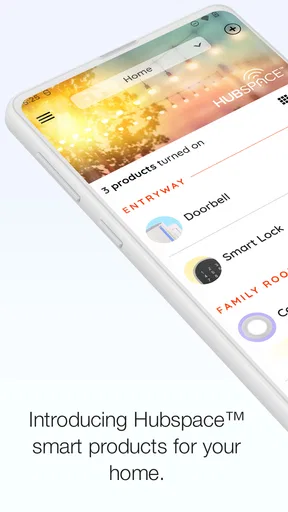
First things first, downloading and setting up Hubspace was a breeze. Available on both Android and iOS, the app is super lightweight, so it won’t hog your phone’s storage. Once installed, I was greeted with a clean, intuitive interface that seemed to say, "Hey, let's get your life sorted!"
Signing up was quick, requiring just a few taps. After that, the app guided me through the initial setup process, including syncing with my smart devices. The seamless integration with my existing tech was impressive, and I didn’t have to jump through hoops to get everything connected.
What to check before connecting devices
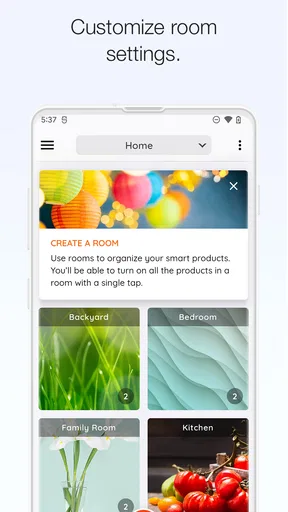
The setup experience is most useful when I approach it as a deliberate inventory rather than a race to add everything. I’d connect one device at a time, give each a name I can recognize at a glance, and test its basic control before building a more involved routine. A label such as “hall light” is more helpful than a vague room or product name when I am trying to switch something off quickly from outside the house.
That small bit of organization also matters if more than one person uses the home. A control that seems obvious to the person who installed it may be confusing to someone else. I would choose names and scenarios that describe the result in plain language, then ask another household member to try them. If they cannot tell what a control will do, I would simplify it before relying on it during a rushed morning or late arrival.
Worth Reading Before You Choose

EA SPORTS FC Mobile 26 Is a Bigger Football Game, but It Takes Time

Flipboard Shows What News Apps Must Do Beyond the Feed

Switching to Android Auto Means Rethinking Your Driving Routine

Google Calendar Makes a Crowded Week Easier to Manage

Ludo King Makes the Most of the Minutes Between Plans

Baby Panda World Brings Quick Play to Modern Phones, but Its Game Library Feels Busy
It is also worth separating convenience from necessity. If I only want to switch one lamp on and off, a physical switch or the device’s own control may be enough. Hubspace makes more sense when I have several compatible devices and want a shared place to manage them. I would avoid buying additional hardware solely on the assumption that every smart product will work together; compatibility should guide the setup, not the other way around.
Features that Stand Out
One of the things I love about Hubspace is how it manages to be both simple and powerful. Here’s what caught my attention:
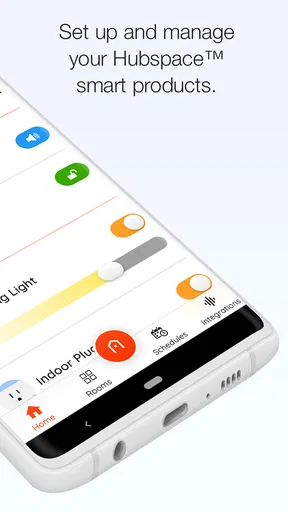
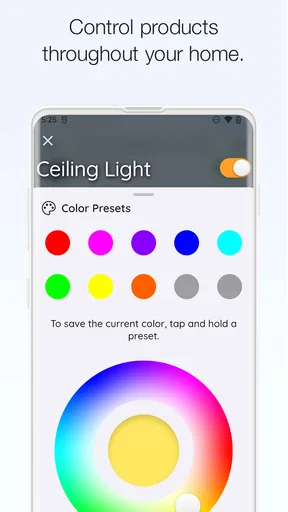
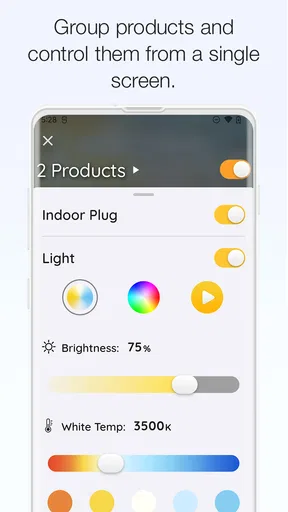
- Device Management: Easily control all your smart home devices from one place. Whether it’s adjusting the thermostat or dimming the lights, it’s all just a tap away.
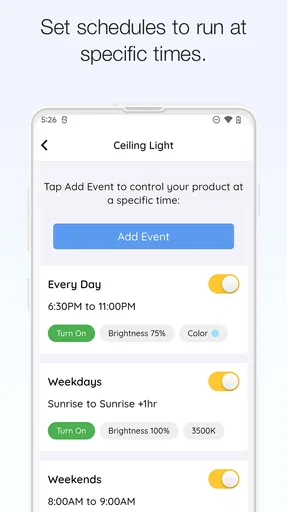
- Scenarios: This feature lets you create customized scenarios for different times of the day. Want your lights to dim and the temperature to drop just in time for movie night? No problem!
- Energy Monitoring: Keep track of your energy usage in real time. It’s a great way to stay eco-friendly and maybe even save a few bucks on your utility bill.
The app also allows for voice control through integration with popular virtual assistants. I found myself chatting with my devices like I was living in a sci-fi movie—it’s actually quite fun!
Routines that help without taking over
Scenarios are most valuable when they solve a repeatable problem, not when they try to automate every small choice. I’d start with a simple evening routine for a few lights, or a “leaving home” action that turns off the devices I commonly forget. The useful test is whether the scenario saves a real step and is easy to remember. If I have to pause to recall what a creatively named routine does, I would rename it or keep the control manual.
A practical trade-off is that automation reduces effort but can also make a wrong assumption happen repeatedly. Before relying on a schedule or a scene, I would consider exceptions: a guest staying over, a change in bedtime, or a day when I am home at an unusual hour. For actions that affect comfort, I prefer a routine I can quickly override rather than one that makes me feel locked into a preset. A manual check after creating a scenario is a good way to catch an unintended combination before it becomes part of the household’s habits.
Energy monitoring can be useful as a way to notice patterns, but I would treat it as guidance rather than a promise of lower bills. Looking at usage is more actionable when I compare similar habits over time and then make one change I can actually maintain. An app can show information, but it cannot decide whether a device’s use is necessary or explain every part of a utility charge. That distinction keeps the feature helpful without expecting it to do more than it can.
Where it fits among smart-home options
Compared with controlling each product through its own app, a shared Hubspace interface can reduce app-hopping and make everyday actions easier to find. That is its clearest advantage for a home with several compatible devices. The trade-off is that a single control app is only convenient if the household’s products fit its ecosystem. If most of the devices I already own rely on another platform, adding Hubspace may create another place to manage rather than simplifying anything.
A device’s own app can be the better choice when I need a product-specific setting or troubleshooting detail that a general home dashboard does not put front and center. Voice assistants can be quicker for hands-free actions, while a phone interface is easier when I want to inspect a control before changing it. I see those options as complements, not automatic replacements: the right choice depends on whether I value a quick command, a detailed device setting, or a single view of several compatible products.
For someone starting a smart home from scratch, I would first decide which devices matter most and check that they can be managed together. For someone with a mixed collection, I would map out the existing apps before adding another. This avoids the common disappointment of expecting one dashboard to absorb every product in the house. Hubspace is a better fit when its supported devices form a meaningful part of the setup, rather than when it is merely one more app installed “just in case.”
Everyday Use and Performance
After using Hubspace for a few weeks, I can confidently say it’s become part of my daily routine. The app runs smoothly without any noticeable lag, and the notifications are timely without being intrusive. I appreciate how it keeps me updated without overwhelming me with alerts.
One day, I was running late for work and realized I’d left the lights on. A quick check on Hubspace, and voila! I turned them off remotely, saving me from a hefty electricity bill. It’s these little conveniences that make this app a keeper.
Small habits that make remote control more dependable
Remote access is handy, but I would not make it the only way I know whether a device is in the state I want. When an action matters, I would look for confirmation in the app and keep the physical switch or device control usable for anyone at home. That gives the household a straightforward fallback if a phone is unavailable, the wrong account is open, or someone simply prefers a normal switch.
Notifications deserve a little attention too. I would keep alerts that help me act, and avoid treating every status change as urgent. Too many messages are easy to ignore, which defeats the point of having them. A useful notification should tell me something I can respond to; routine information that does not change what I do can be checked when I open the app instead.
For a realistic weekday routine, I might use a scene to set a comfortable evening lighting arrangement, then turn off a forgotten light after leaving. The first action is about convenience at home; the second is about correcting a small oversight away from home. I would still keep the routine modest and check the result when I set it up. Those are the kinds of jobs where a smart-home app earns its place without making ordinary tasks depend on a complicated chain of automation.
Privacy-minded use and control
Because this app is tied to connected devices and an account, I would make choices carefully during setup rather than tapping through every prompt automatically. I would review the permissions the phone requests in context and allow only what makes sense for the feature I am using. If a permission seems unrelated to the task in front of me, I would pause and check the app’s explanation and my phone’s settings before proceeding.
I would also think about account access as part of home access. Use an account arrangement that the household can manage responsibly, keep the phone itself protected, and be intentional about who can operate connected devices. If I lend my phone or share access with another person, I would consider what they can control, not just whether they can open the app. Those are practical safeguards for any connected-home setup, without assuming anything about a company’s data practices that I cannot verify from the interface.
When installing an update, I would take a moment to review any visible changes to permissions or settings and confirm that my key device controls still behave as expected. Hubspace is at version 2.1.1, and the app is rated for Everyone; neither detail removes the need for ordinary care with account security and home devices. I would keep the app current through the platform’s normal update process, while staying alert to changes that affect how I use it.
Who will appreciate it, and who may not
I think Hubspace is most appealing to people who already have compatible smart-home products, want an accessible control point, and are willing to spend a little time naming devices and testing routines. It can also suit someone who is new to connected devices and prefers to begin with a few clear actions instead of building a complicated system. The app’s straightforward approach is easier to live with when the setup is intentionally small and each control has a purpose.
I would skip it if I do not own compatible devices, strongly prefer local physical controls, or already have a smart-home platform that brings my products together well. It may also frustrate someone who expects every brand and every advanced setting to appear in one place. In those situations, sticking with the device maker’s own controls or the ecosystem I already use may be simpler than maintaining another account and another app.
The app is free, which makes trying it less of a financial commitment, but the overall smart-home setup may still involve devices that suit a person’s needs and budget. I would decide whether the app solves a real inconvenience before expanding the hardware around it. A useful test is to name one repeated task I want to improve; if I cannot identify one, there may be no reason to add another layer to the home yet.
Final Thoughts
Overall, Hubspace is a game-changer for anyone looking to streamline their smart home experience. It’s user-friendly, packed with features, and integrates seamlessly with existing devices. Whether you’re a tech newbie or a seasoned smart home aficionado, Hubspace is worth checking out.
So, if you're looking to bring some order to your digital chaos, give Hubspace a try. It might just be the app you didn’t know you needed, but now can’t live without!
My cautious recommendation
My recommendation is to treat Hubspace as a practical control layer, not as a reason to automate everything or assume every connected product belongs in one system. Its appeal is clearest when compatible devices, simple scenarios, and remote checks genuinely make daily life easier. I would start small, test the controls, and keep a comfortable manual fallback for the moments when an app is not the best way to act.
Afero’s House & Home app has a 4.7 average, around 4,200 written reviews, and is free to use. It was released on December 3, 2020, and runs on Android 7.0 or later. Those details help set expectations about availability, but my decision would still come down to device fit and the controls I actually need. If that fit is there, Hubspace is worth trying; if not, the simplest choice may be the system already serving the home.
Pros
- User-friendly interface for easy navigation.
- Supports a wide range of smart devices.
- Seamless integration with voice assistants.
- Offers real-time device status updates.
- Customizable automation routines.
Cons
- Limited compatibility with some brands.
- Occasional connectivity issues reported.
- App updates can be slow to release.
- Requires a stable internet connection.
- No desktop version available.
FAQs for Hubspace
What is Hubspace and what does it offer?
Hubspace is a smart home management app designed to integrate and control various smart devices within your home. It offers a seamless interface to monitor and manage lighting, security systems, and other smart appliances. The app provides real-time updates and the ability to schedule tasks, enhancing home automation.
Is Hubspace compatible with all smart devices?
Hubspace supports a wide range of smart devices, but it's essential to check the compatibility list on their website or app description. While it covers many popular brands, some older or less common devices might not be supported. Regular updates also expand compatibility, so keeping the app updated is recommended.
How does Hubspace ensure user privacy and data security?
Hubspace prioritizes user privacy by implementing robust data encryption and secure login protocols. Personal information and device data are safeguarded with industry-standard practices. It's essential to review their privacy policy for detailed insights into how your data is managed and to ensure you're comfortable with their practices.
Does Hubspace require a subscription or any in-app purchases?
Hubspace offers its basic features for free, but certain advanced functionalities may require a subscription. In-app purchases can include premium features, additional device integrations, or enhanced customer support. Users should review the app store details to understand any potential costs before downloading.
What kind of customer support does Hubspace provide?
Hubspace offers comprehensive customer support through various channels including email, live chat, and a detailed FAQ section on their website. They also provide instructional guides and video tutorials to assist users in troubleshooting and maximizing the app’s features. Response times can vary, but they strive for prompt assistance.


